How Can We Help?
New Order Window
The New Order Window allows a choice between four available order types:
- Spot -the standard settlement timeframe for FX Spot contracts is T+2; i.e., two business days from the trade
- Tomorrow -the standard settlement timeframe for FX TOM contracts is T+1; i.e., one business day from the trade date
- Forward -available on request
- Limit Order -an order to buy or sell currency at a specified price or better
To open a New Order, select a currency pair to trade from the available symbols list by clicking on the required pair.
Once the pair to trade is selected, insert the amount of the currency to Sell or Buy. Please note that the Spot contract will be preselected by default.
If you are an importer and wish to purchase a foreign currency, always ensure the bottom field has your foreign currency displayed, whilst the top field will display the AUD flag.
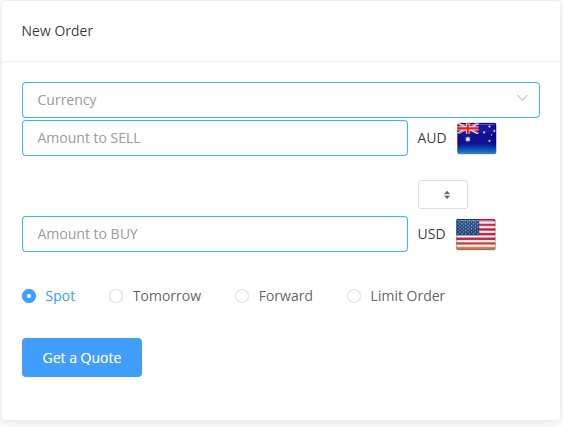
Exporters should do the exact opposite: ensure that the foreign currency flag will be on the top and the AUD flag will be on the bottom.
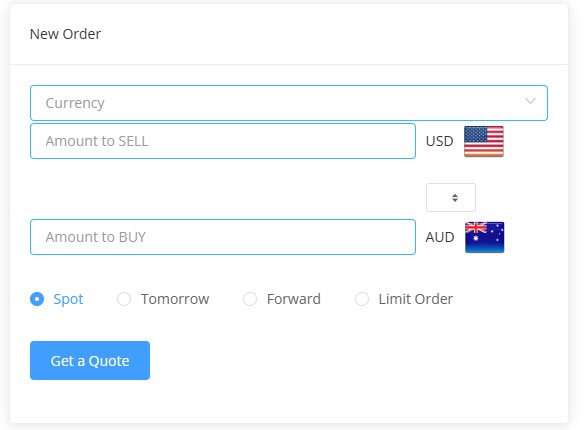
You can alternate between the Sell and Buy currencies by clicking on the switch button below.

Once the currency to Sell or Buy amount is inserted, the corresponding currency amount will be calculated automatically at the current rate.
To proceed, click the blue tab “Get a Quote”.

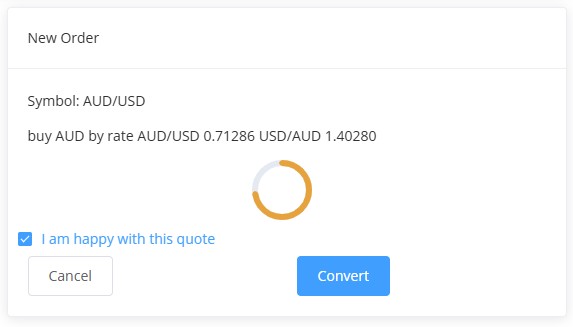
The confirmation screen will appear. Select the checkbox if you are happy with the quoted rate, then click the blue tab – Convert to proceed with the order; otherwise, the quote will expire after 15 seconds.